-
Does DisplayPort have ARC and eARC audio return function?

DisplayPort standard does not equip with native ARC and eARC audio return mechanism like HDMI. It focuses on one-way high-quality audio and video output. If audio return transmission is needed, matched external audio processing equipment is required for auxiliary realization.
-
What audio formats can DisplayPort decode and transmit?
DisplayPort is compatible with mainstream advanced audio formats on the market. It covers Dolby Atmos, DTS series immersive sound, lossless high sampling rate audio and common compressed audio formats, covering diverse audio demands of movies, games and music playback.
-
Is DisplayPort better than HDMI in 2026?
As of 2026, DisplayPort 2.1 offers significantly higher bandwidth and advanced features like Display Stream Compression with dynamic metadata, supporting ultra-high resolutions and refresh rates ideal for gaming and professional use. HDMI 2.1 is widespread in consumer devices but typically lags behind DisplayPort in PC-focused performance scenarios.
-
What are the core usage scenario differences between DisplayPort and HDMI?
DisplayPort and HDMI are positioned for completely different application scenarios in the digital audio and video industry. HDMI is a consumer-oriented universal interface, mainly designed for home entertainment devices including smart TVs, game consoles, projectors, and home theater systems, focusing on plug-and-play simplicity, audio return synchronization, and device interconnection control. In contrast, DisplayPort is a professional PC-grade interface, specially optimized for desktop computers, laptops, professional design monitors, high-refresh gaming screens, and multi-screen splicing workstations. It prioritizes ultra-high bandwidth, stable high-resolution output, and multi-stream transmission, making it more suitable for professional office, creative design, and high-end gaming scenarios rather than ordinary home audio-visual entertainment.
-
Does DisplayPort MST multi-screen splicing work better than HDMI multi-screen connection?
Yes, DisplayPort’s MST (Multi-Stream Transport) technology has an absolute advantage over ordinary HDMI multi-screen connection solutions. A single DisplayPort interface can stably output signals to multiple monitors in series while maintaining independent high-resolution and high-refresh display effects, without occupying extra device interfaces. Traditional HDMI interfaces do not support native series multi-screen transmission. To realize multi-screen output, users need additional splitters or independent signal sources, which is prone to signal attenuation, frame drop, and resolution compression. For users who need dual-screen or multi-screen office, design and monitoring work, DisplayPort MST brings more stable, smoother and lower-cost multi-display experience.
-
Which interface has stronger compatibility with new gaming devices, DP or HDMI?
For professional gaming devices, DisplayPort has stronger comprehensive compatibility and performance adaptability, while HDMI is more friendly for mainstream consumer game consoles. High-end gaming graphics cards, gaming laptops and 4K/2K high-refresh gaming monitors are all equipped with upgraded DisplayPort interfaces, which support higher refresh rates up to 240Hz/480Hz, lower input lag, and adaptive sync technologies such as G-SYNC and FreeSync in full specifications. HDMI interfaces are widely used on PS5, Xbox and other home game consoles, with better device adaptation, but their bandwidth and dynamic display optimization are slightly inferior to DisplayPort. For PC gamers pursuing extreme smoothness and low delay, DisplayPort is the first choice; for home console gaming, HDMI is more applicable.
-
What are the advantages of HDMI CEC and ARC functions compared with DisplayPort?
HDMI’s unique CEC (Consumer Electronics Control) and ARC/eARC audio return functions are core advantages that DisplayPort does not have. HDMI CEC realizes inter-device intelligent control, allowing users to control multiple connected devices such as TVs, speakers and set-top boxes through one remote control, simplifying home device operation. ARC and eARC support one-cable audio return, which can transmit TV audio back to soundbars and home theater speakers without additional audio cables, realizing clean and simple home audio-visual wiring. DisplayPort focuses on forward high-performance audio and video output, without native device control and audio return functions, so it is far less suitable for home theater integrated wiring than HDMI.
-
Can USB-C DisplayPort Alt Mode replace traditional HDMI connection?
USB-C DisplayPort Alt Mode can replace HDMI connection in most mobile and PC scenarios, and delivers better performance. It integrates audio, video and data transmission functions in a single thin cable, supporting ultra-high resolution and high-refresh screen output, lossless Dolby Atmos audio transmission, and fast signal response. It is compatible with laptops, tablets, mobile phones and portable monitors. Compared with traditional HDMI cables, it is more portable and versatile. The only limitation is that it does not support HDMI exclusive functions such as CEC control and ARC audio return, so it cannot fully replace HDMI in home theater fixed wiring scenarios.
-
Which interface should I choose for daily use, DisplayPort or HDMI?
The choice depends entirely on your daily usage scenarios and device types. If you mainly use PCs, professional monitors, high-refresh gaming screens, and need multi-screen office, graphic design or high-frame-rate game experience, DisplayPort is the best choice for its higher bandwidth, lower delay and more stable high-performance output. If you focus on home entertainment, connecting TVs, projectors, game consoles and audio equipment, HDMI is more suitable, thanks to its perfect compatibility with home devices, convenient ARC audio return and CEC intelligent control functions. For mixed-use scenarios, qualified DP-HDMI conversion accessories can realize mutual switching and meet diverse connection needs.
-
USB4 Version 2 Introduction
Released by the USB Implementers Forum, USB4 Version 2 is a groundbreaking upgrade to the traditional USB protocol, delivering comprehensive leaps in data transmission, video output, and power delivery performance. It features a maximum bandwidth of 80 Gbps, doubling the transmission speed of the original USB4 standard. This substantial bandwidth upgrade enables ultra-fast large-file data transmission, high-spec video signal output, and stable operation for high-performance devices. Meanwhile, USB4 v2 retains full backward compatibility with legacy USB standards, offering excellent versatility and seamless adaptability for all types of existing devices.
USB4 Version 2 greatly optimizes display protocol support, fully compatible with the latest DisplayPort 2.1 specification. It supports ultra-high-definition video signal transmission, perfectly catering to high-demand scenarios including professional video editing, high-frame-rate gaming, and high-resolution multimedia presentation. Equipped with dynamic bandwidth allocation technology, it can intelligently distribute bandwidth resources for data transmission and video output in real time. This mechanism ensures balanced and stable peak performance of connected devices even when running multiple high-load tasks simultaneously.
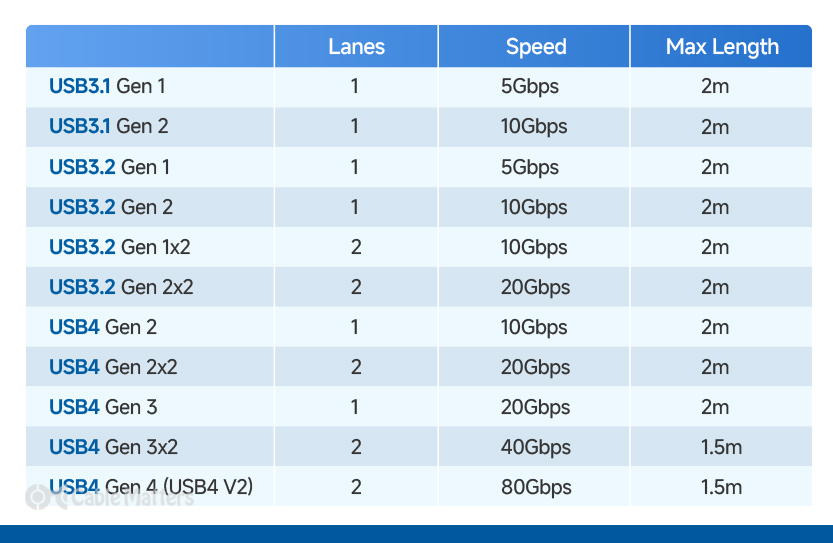
In terms of power delivery, USB4 v2 achieves a prominent performance upgrade with a maximum power supply capacity of 240W. It can efficiently charge power-intensive devices such as high-performance laptops while synchronously transmitting data and video signals through a single cable. This all-in-one transmission solution simplifies device connection setups thoroughly, eliminating messy wiring and delivering high-efficiency, uncompromising comprehensive performance for daily office, creation, and entertainment use.
As a premium certified accessory for USB4 Version 2, the Cable Matters USB4 v2 cable delivers full-spec flagship performance with official USB-IF certification. It stably supports 80Gbps ultra-high-speed data transmission, drastically shortening the transmission time of large-capacity files and high-bandwidth resources. For video output, it supports extreme display specifications of 8K@120Hz and 4K@480Hz, perfectly adapting to professional creation, high-end gaming, and ultra-high-definition video viewing scenarios, bringing users a top-tier integrated experience of high-speed transmission, high-spec video display, and high-power charging.
-
What extra functional features does USB4 offer beyond fast data transfer?
Beyond its renowned high-speed data transmission, USB4 integrates a comprehensive all-in-one functional system that greatly upgrades traditional USB capabilities. It delivers upgraded intelligent USB Power Delivery, professional-grade video output via DisplayPort Alt Mode, flexible dynamic bandwidth allocation, and stable multi-device compatibility. Unlike older USB standards that only focus on single data transfer or basic charging, USB4 unifies data transmission, video signal output, and power delivery on one single cable. It also supports adaptive resource scheduling under multi-task loads, covering professional creation, high-end gaming, office work, and device charging scenarios, realizing true one-cable multi-purpose efficiency.
-
What is the difference in power delivery between standard USB4 and USB4 Version 2?
The original standard USB4 specification supports a maximum 100W USB-C power delivery, sufficient for charging mainstream lightweight laptops and daily digital devices. In contrast, the upgraded USB4 Version 2 comprehensively elevates the power ceiling to 240W, fully compatible with high-power gaming laptops, workstations, and power-hungry professional equipment. More importantly, USB4 v2 adopts intelligent adaptive power distribution and bidirectional power transmission technology. It can automatically match the optimal charging power according to the device’s demand, and supports reverse power supply, enabling external monitors and other peripherals to charge host devices, which standard USB4 cannot achieve.
-
Does all USB4 hardware and cable support the full 240W power delivery?
No, not all USB4 ports and cables support the maximum 240W fast charging capability. The USB-IF official specification clearly defines graded power standards for USB4 accessories and interfaces. Early standard USB4 cables only support up to 100W power delivery, while only certified USB4 Version 2 active cables and full-spec host interfaces can unlock 240W high-power charging. To help users identify specifications accurately, official mandatory logo marking is adopted for different wattage levels, avoiding low-power cables failing to charge high-performance laptops or causing unstable power supply.
-
What display protocol upgrades does USB4 Version 2 bring compared with classic USB4?
Traditional USB4 is limited to DisplayPort 1.4 Alt Mode, supporting mainstream high-definition video output but lacking support for ultra-high resolution and ultra-high refresh rate extreme display specifications. USB4 Version 2 with 80Gbps ultra-high bandwidth officially upgrades to DisplayPort 2.1 protocol, achieving a qualitative leap in video transmission capacity. It supports 4K@240Hz high-frame-rate gaming display, single 10K@60Hz ultra-high-resolution professional screen output, and extreme specifications such as 8K@120Hz and 4K@480Hz. This upgrade fully meets the rigorous visual demands of professional color grading, video production, and high-end esports gaming.
-
What are the advantages of certified USB4 Version 2 cables over ordinary USB-C cables?
Ordinary generic USB-C cables only support basic data transmission and low-power charging, with limited bandwidth, unstable signal transmission, and no professional video protocol adaptation. In comparison, official USB-IF certified USB4 Version 2 cables own full-spec 80Gbps ultra-high-speed transmission capacity, complete DisplayPort 2.1 video protocol compatibility, and 240W full-power fast charging support. They pass strict official certification tests in terms of signal anti-interference, long-distance transmission stability, and multi-device compatibility, effectively avoiding black screen, signal drop, charging failure and other common problems of inferior cables, ensuring long-term stable high-performance operation.
-
Why is USB‑C PD called a universal one-charger solution?
Traditional charging protocols are fragmented, with different devices equipped with exclusive chargers of different powers and interfaces, resulting in cumbersome carrying and low versatility. USB‑C PD unifies the charging standards for almost all mainstream digital devices. With its wide power coverage from low power to 240W high power and excellent cross-device compatibility, a single USB‑C PD charger can safely and quickly charge smartphones, tablets, laptops, Bluetooth devices, portable hard drives and other equipment. It completely solves the trouble of preparing multiple chargers for different devices, realizing true universal charging.
-
What is the maximum charging speed gap between USB‑C PD and ordinary USB charging?
The speed gap between USB‑C PD and ordinary USB charging is extremely obvious in actual use. Ordinary standard USB charging is limited by low power specifications, requiring several hours to fully charge large-capacity devices such as laptops and tablets. USB‑C PD with up to 240W ultra-high power can achieve ultra-fast power replenishment. It can charge most mobile phones to 70% in a short time, and a 10-minute quick charge can support all-day light use. For high-power devices such as laptops, it can shorten the full charging time by more than half. While improving charging efficiency, it ensures stable power supply and device safety.
-
Can USB‑C PD chargers automatically adapt to different devices?
Yes, USB‑C PD adopts an intelligent adaptive power negotiation mechanism, which is the core advantage different from ordinary fixed-power chargers. When a USB‑C PD charger is connected to a device, the charger and the device will automatically communicate and identify each other’s power specifications in real time. The charger will intelligently match the safest and most suitable output power according to the device’s actual power demand, instead of outputting the maximum power blindly. Whether it is low-power devices such as Bluetooth earbuds and smart watches or high-power devices such as gaming laptops and workstations, it can achieve accurate power adaptation, realizing one charger compatible with all devices.
-
What makes USB‑C PD charging far more efficient than traditional USB charging?
Traditional regular USB charging adopts fixed low-power output mechanisms, generally limiting power output between 2.5W and 15W, with slow charging speeds and single functional modes that can only realize basic power supply. In contrast, USB‑C Power Delivery features intelligent dynamic power negotiation and high-power transmission architecture. It supports a maximum power output of 240W and achieves simultaneous high-speed data transmission and fast charging. Compared with conventional 5W standard charging, USB‑C PD can boost charging efficiency by up to 70% or more. It can quickly replenish power for various devices, and a short 10-minute quick charge can support long-duration light use, bringing extremely efficient and convenient power supply experience that ordinary USB charging cannot match.
-
Do Cat7 cables deliver faster internet speeds than Cat6 for home use?
For standard home network use, Cat7 cables do not provide faster internet speeds than Cat6. Most household broadband only runs 1Gbps to 2.5Gbps, which is fully covered by Cat6’s 10Gbps maximum bandwidth. The main upgrade of Cat7 lies in enhanced shielding and anti-interference performance, not higher daily speed limits. It only delivers noticeable stability improvements in complex environments with heavy electromagnetic interference. For regular home browsing, video streaming and casual gaming, Cat6 offers equally stable performance with better cost-effectiveness, making it the ideal choice for ordinary home network setups.
Manufacturer Of High Quality Data Cable